
The Advantages of OpenClaw: Why This Open-Source AI Agent Is Changing How We Work
Privacy-first, open-source, and integrated into every chat app you use — OpenClaw offers unique advantages over cloud-based AI assistants. Here is why developers and professionals are making the switch.

Codmaker
Independent product lab
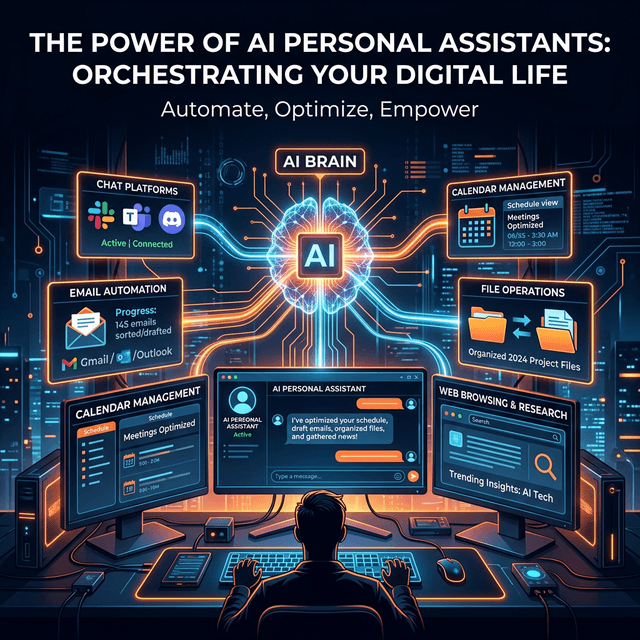
Privacy by Default: Your Data Stays on Your Machine
The most compelling advantage of OpenClaw over cloud-based AI assistants is privacy. When you use ChatGPT, Gemini, or other cloud services, your prompts—including any sensitive data they contain—are sent to external servers where they may be logged, analyzed, or used for training. OpenClaw runs entirely on your machine. Your conversations, files, preferences, and agent memory are stored locally, never leaving your control. For professionals who work with confidential client data, proprietary code, or sensitive business information, this is not a nice-to-have feature—it is a fundamental requirement.
This local-first architecture means you can safely ask OpenClaw to analyze financial reports, review legal documents, debug proprietary source code, or discuss strategic business plans without any concern about data leakage. You choose the AI backend—and even if you use a cloud provider like Anthropic or OpenAI for the language model, the only data sent is the specific prompt, not your broader conversation history, memory, or files. For maximum privacy, you can run a local model like Llama or Mistral, keeping everything entirely on your hardware.
The privacy advantage extends to the messaging integrations. When you chat with OpenClaw on WhatsApp or Telegram, the message goes from the chat app to the Gateway running on your machine—it never passes through OpenClaw's servers. The project is fully open-source on GitHub, meaning the codebase can be audited by anyone. There are no hidden data collection mechanisms, no telemetry you did not opt into, and no corporate decisions about what to do with your data. You are in complete control.
For organizations with strict compliance requirements—HIPAA in healthcare, SOC 2 in technology, GDPR in Europe—OpenClaw's local-first architecture dramatically simplifies compliance. Instead of evaluating the data handling practices of a third-party AI vendor, you maintain all data on infrastructure you control. This makes it feasible to deploy AI assistance in environments where cloud-based AI tools would be prohibited by policy or regulation.
Multi-Platform Integration: One AI Agent, Every Chat App
Most AI assistants lock you into a single interface—a website, an app, or an IDE plugin. OpenClaw takes the opposite approach: it integrates into the tools you already use. WhatsApp, Telegram, Discord, Slack, Signal, iMessage—OpenClaw works across all of them simultaneously. This means you can interact with your AI agent from whatever device and platform you happen to be using at the moment, without installing yet another app or keeping yet another browser tab open.
The practical impact of multi-platform integration is enormous. You are commuting and remember you need to reschedule a meeting—send a WhatsApp message to OpenClaw from your phone. You are in a team Slack channel and need to quickly check documentation—mention OpenClaw and get the answer inline. You are debugging an issue on your desktop and want to run some terminal commands—message OpenClaw on Telegram. The AI agent is always available wherever you are, removing the friction of context-switching between tools.
Group chat support is particularly valuable for teams. Add OpenClaw to a project's Discord or Slack channel, and the entire team has access to an AI agent that understands the project context. Team members can ask questions, request code reviews, trigger deployments, or get status updates—all within the natural flow of team communication. This is more powerful than giving each team member their own separate AI subscription because the shared OpenClaw instance maintains persistent context about the project.
The integration depth goes beyond simple message forwarding. OpenClaw understands the conventions of each platform—it can use rich formatting on Slack, send images and documents on Telegram, and handle the message size limitations of SMS and iMessage. With over 50 integrations available, including email, calendar, and file system access, OpenClaw becomes a true unified interface for your entire digital life, accessible from any messaging platform you choose.
- Works on WhatsApp, Telegram, Discord, Slack, Signal, and iMessage simultaneously
- No new app required—interact from whatever device and platform you are already using
- Group chat support: add to team channels for shared AI capabilities with project context
- Rich formatting: adapts to each platform's conventions and capabilities
- 50+ integrations: email, calendar, file system, browser, APIs, and more
Open Source Power: Transparency, Customization, and Community
Being open-source is not just a philosophical choice for OpenClaw—it provides tangible practical benefits that closed-source alternatives cannot match. Full source code transparency means you can inspect exactly what the agent does with your data, how it processes commands, and what information it sends to AI providers. In an era of increasing concern about AI safety and data privacy, this transparency is invaluable. You do not have to trust marketing promises—you can verify them in the code.
Customization is another major advantage. With access to the source code, you can modify OpenClaw's behavior to match your exact needs. Enterprise teams can add custom authentication, integrate with internal APIs, implement company-specific compliance checks, or modify the agent's decision-making logic. This level of customization is simply impossible with closed-source AI assistants, where you are limited to whatever configuration options the vendor chooses to expose.
The OpenClaw community is a vibrant ecosystem of developers, power users, and enthusiasts. The ClawHub skill marketplace offers community-created extensions for dozens of use cases, from home automation and financial tracking to development workflows and content creation. If you build a useful skill, you can share it with the community. If you encounter a bug, you can fix it yourself or report it for rapid community resolution. The collaborative development model means OpenClaw improves faster and more responsively than any corporate product.
The project has earned notable recognition, being featured in MacStories where it was described as showing 'what the future of personal AI assistants looks like.' The partnership with VirusTotal for skill security demonstrates the project's maturity and commitment to safety. For developers evaluating AI tools, OpenClaw represents the best of open-source development: professional quality, active maintenance, transparent development, and a passionate community.
Real-World Use Cases: What People Actually Build with OpenClaw
Developers are using OpenClaw as a remote development assistant. When they are away from their desk—commuting, in a meeting, or simply taking a walk—they can message OpenClaw to run commands on their development machine, check build status, review error logs, and even make quick fixes. One developer described it as 'having SSH to my development machine, but with an AI that understands what I actually want to accomplish.' Common tasks include running test suites, checking git status, deploying to staging environments, and searching codebases for specific patterns.
Professionals are using OpenClaw for automated daily briefings. Every morning, OpenClaw compiles a personalized summary: unread emails categorized by priority, calendar events for the day, reminders about deadlines, and relevant news from specific topics. This briefing arrives as a message on their preferred chat platform, ready to read during their morning coffee. Over time, OpenClaw learns what information is most important to each user and refines the briefing accordingly.
Small business owners are using OpenClaw as a virtual assistant that rivals services costing thousands of dollars per month. OpenClaw handles email responses, schedules meetings, tracks invoices, manages social media posts, and even performs market research—all controlled through simple chat messages. Because it runs locally and uses affordable AI backends, the total cost is a fraction of hiring a human assistant or subscribing to multiple SaaS tools.
The trend driving OpenClaw adoption is clear: people want AI agents that actually do things, not just talk about things. As Federico Viticci of MacStories noted, OpenClaw represents a paradigm shift from AI as a 'question-answering machine' to AI as a 'personal assistant that takes action.' The fact that it runs locally, respects privacy, works across all platforms, and is freely available as open source makes it uniquely positioned to become the personal AI agent for anyone who values both capability and control.
- Remote development: run commands, check builds, deploy—all from your phone via chat
- Automated briefings: daily email, calendar, and news summaries tailored to your priorities
- Virtual assistant: email management, scheduling, invoicing, research at a fraction of the cost
- Team workflows: shared agent in Slack/Discord channels with persistent project context
- Home automation: control smart home devices through conversational chat commands
- Content creation: research, draft, and publish content across platforms from a single message
Related reading
Mar 15, 2026
OpenClaw: The Complete Guide to Installing and Using Your Personal AI Agent
OpenClaw is the open-source AI assistant that actually does things — managing your inbox, calendar, and files from WhatsApp, Telegram, or any chat app. Here is everything you need to get started.

Mar 11, 2026
How to Use Claude AI Effectively: A Practical Guide for Developers and Professionals
Claude by Anthropic is one of the most capable AI assistants available. This hands-on guide shows you exactly how to leverage Claude for coding, analysis, writing, and complex problem-solving.
Mar 8, 2026
The Advantages of Claude AI: Why More Teams Are Switching to Anthropic's AI Assistant
From its industry-leading context window to its safety-first design philosophy, Claude offers unique advantages that are making it the AI assistant of choice for developers, researchers, and businesses.